Technology Device Icon Set 4: A Practical Evaluation for Designers and Developers
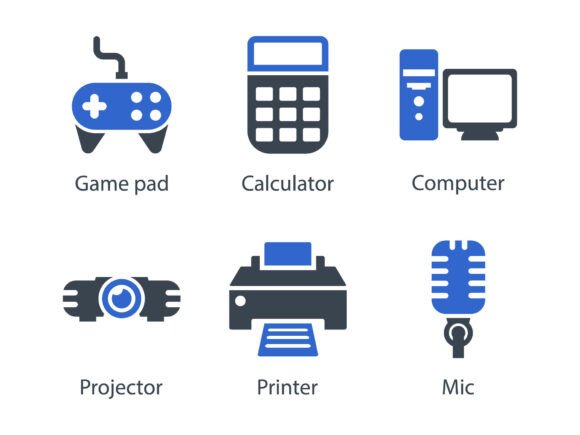
Technology Device Icon Set 4 is a curated collection of 7 high-fidelity glyph-style icons representing common hardware devices: game pad, calculator, computer, projector, printer, microphone, and a generic icon placeholder. Each symbol is crafted with precision—clean lines, consistent stroke weight, balanced proportions, and deliberate negative space—to support clarity across scales and contexts. The set delivers assets in three widely supported formats: EPS (for vector editing and print), SVG (for responsive web use and scalability), and PNG (in multiple resolutions for immediate raster integration).
Why Consider Technology Device Icon Set 4?
Designers and developers often need reliable, production-ready icons that communicate function without visual noise. Technology Device Icon Set 4 addresses this by offering a focused, cohesive subset—not an exhaustive library, but a purpose-built group of symbols tied to tangible hardware interactions. Its value emerges most clearly when consistency, technical compatibility, and time efficiency matter more than stylistic variety.
For example, a team building a device management dashboard may need icons that represent input (mic), output (projector, printer), computation (calculator, computer), and control (game pad). Rather than sourcing mismatched assets from disparate libraries—or spending hours refining custom glyphs—this set provides a unified visual language out of the box.
Key Benefits and Real-World Utility
The primary benefit lies in its meticulous glyph design. Unlike illustrative or skeuomorphic icons, these are minimal, monoline, and geometrically grounded—making them legible at small sizes (e.g., 16×16px in UI toolbars) and scalable without distortion. Their neutrality avoids cultural or brand-specific associations, supporting international interfaces and neutral documentation.
Format flexibility adds practical utility. EPS files allow precise editing in Adobe Illustrator or CorelDRAW for print collateral like spec sheets or training manuals. SVG files integrate cleanly into HTML/CSS workflows, support CSS-based color manipulation, and remain crisp on high-DPI displays. PNG variants—typically offered at 32×32, 64×64, 128×128, and 256×256 pixels—enable straightforward use in PowerPoint presentations, PDF reports, or legacy CMS environments where SVG support is limited.
Tradeoffs and Important Considerations
Technology Device Icon Set 4 is intentionally narrow in scope. It contains only seven icons, with no variants (e.g., no “off” state for the mic, no “wireless” or “USB” modifiers), no animated versions, and no extended device categories like servers, routers, or wearables. Users requiring broader coverage—such as a full tech ecosystem library for enterprise software—will likely need to supplement it or choose a larger collection.
Its glyph aesthetic prioritizes abstraction over literalism. While this supports scalability and timelessness, it may reduce immediate recognition for audiences unfamiliar with minimalist icon conventions—particularly in consumer-facing apps where friendlier, more expressive icons improve usability. Also, because it’s a static set (not a subscription or cloud-based service), there’s no built-in mechanism for future updates or additions.
Licensing terms vary by vendor, but most distributions grant broad usage rights—including commercial projects—provided attribution isn’t required. Still, users should verify permissions for redistribution (e.g., bundling icons into a SaaS platform’s frontend code) or modification (e.g., recoloring SVGs programmatically), as some licenses restrict derivative works.
When Technology Device Icon Set 4 Is a Strong Fit
This set suits scenarios where consistency, technical reliability, and rapid implementation outweigh the need for stylistic diversity or extensive coverage. It works well for:
- Internal admin dashboards or IT service portals where clear, unambiguous hardware representation supports task efficiency;
- Technical documentation or instructional materials—especially printed or PDF-based—where vector fidelity and resolution independence are critical;
- Presentations targeting technical stakeholders (e.g., infrastructure overviews, product demos) where clean, professional visuals reinforce credibility;
- Small-to-midsize web applications with limited device-related UI elements, where loading a lightweight SVG sprite is preferable to embedding a large icon font or CDN dependency.
When Alternatives May Be More Appropriate
Consider other options if your project demands:
- Broader coverage: Libraries like Font Awesome, Tabler Icons, or Material Symbols offer hundreds of technology-related icons—including states (e.g., “mic-off”), actions (e.g., “print-outline”), and conceptual symbols (e.g., “cloud”, “server”)—with consistent styling and robust developer tooling.
- Dynamic behavior: If you need interactive states (hover, active, disabled), animations, or icon transitions, a CSS-based icon system or SVG sprite with JavaScript control may be more maintainable than static files.
- Brand-aligned customization: When icons must match a specific brand palette, stroke style, or corner radius, a custom icon suite—designed alongside your UI system—often yields better cohesion than adapting pre-made glyphs.
- Accessibility-first requirements: While all formats here support alt text and ARIA labeling in practice, some icon systems include built-in accessibility guidance (e.g., recommended label phrasing, contrast validation), which can reduce implementation overhead.
Making a Practical Decision
Evaluate Technology Device Icon Set 4 against your actual asset needs—not theoretical ideals. Start by listing the exact devices or functions you must represent. If all seven icons align with those needs, and no additional symbols are required for launch or near-term iterations, the set offers a predictable, low-friction solution.
Next, assess your delivery context. If your project spans web, print, and presentation formats—and you lack in-house vector expertise—the bundled EPS/SVG/PNG package reduces format-conversion risk. Conversely, if your workflow relies heavily on icon fonts or design-system tokens, integrating individual SVG files may require extra tooling or documentation effort.
Finally, consider maintenance. Static icon sets simplify version control and auditing but don’t evolve with your product. If your application’s hardware vocabulary will expand meaningfully within 6–12 months (e.g., adding IoT sensors, VR headsets, or edge devices), investing in a scalable icon strategy—whether a modular library or custom design system—may prove more sustainable.
In summary, Technology Device Icon Set 4 is not a universal replacement for all icon needs. It is a targeted tool: effective when its scope matches your functional requirements, its glyph style aligns with your audience’s expectations, and its delivery formats integrate smoothly into your production pipeline. For teams valuing precision, consistency, and immediacy over breadth or adaptability, it remains a pragmatic choice among available resources.